
MeeBhoomi Ap – Adangal | Village Maps, FMB & Bhoomi
Welcome to MeeBhoomi (మీ భూమి) of Andhra Pradesh. On this website, you can check your land records online. You can view 1B, Adangal, Village Map, E-Passbook, FMB, Mutation status, and other important land details from your home.
The Andhra Pradesh Revenue Department created the MeeBhoomi portal to make land records easy to access. People can search for land information, ownership details, and other property records online. In this guide, we will explain how you can check your land records step by step in a simple way.
Available Land Records on Meebhoomi
✅ Check Your Land Details
- View your Adangal or Village Adangal records
- Check your 1-B or Village 1-B details
- See your LP Map, FMB, or Village Map
- View ROFR Adangal or Village 1-B information
- Check the Survey Number Dispute Register Report
✅ Check Your Application Details
- Edit Mutation or LP records
- Update LP record descriptions
- Apply for Land Use Change
- Request Survey Number Record Corrections
- Download Ownership Certificates & Proceedings
- Check your Aadhaar Linking Status
- Download your Electronic Passbook
- View the Village Land Disputes Table
- Access Other Land Records
| Portal | Meebhoomi AP |
| https://meebhoomi.ap.gov.in/ | 1B Adangal, Village Map, Mutation, E-Passbook (FMB) and Other Land Records |
| Launched by | Government of Andhra Pradesh |
| Managed by | Department of Revenue Andhra Pradesh |
How to Check Land Records on Meebhoomi?
Visit AP Mee-Bhoomi Official Portal
To check land records in Andhra Pradesh, you need to visit the official Mee-Bhoomi AP website. This online portal helps people easily view important land details. You can check records like 1-B Adangal, Village Map, E-Passbook Status, FMB, Land Conversion details, and other land information. It is a simple and convenient way to see your land records online without visiting government offices.
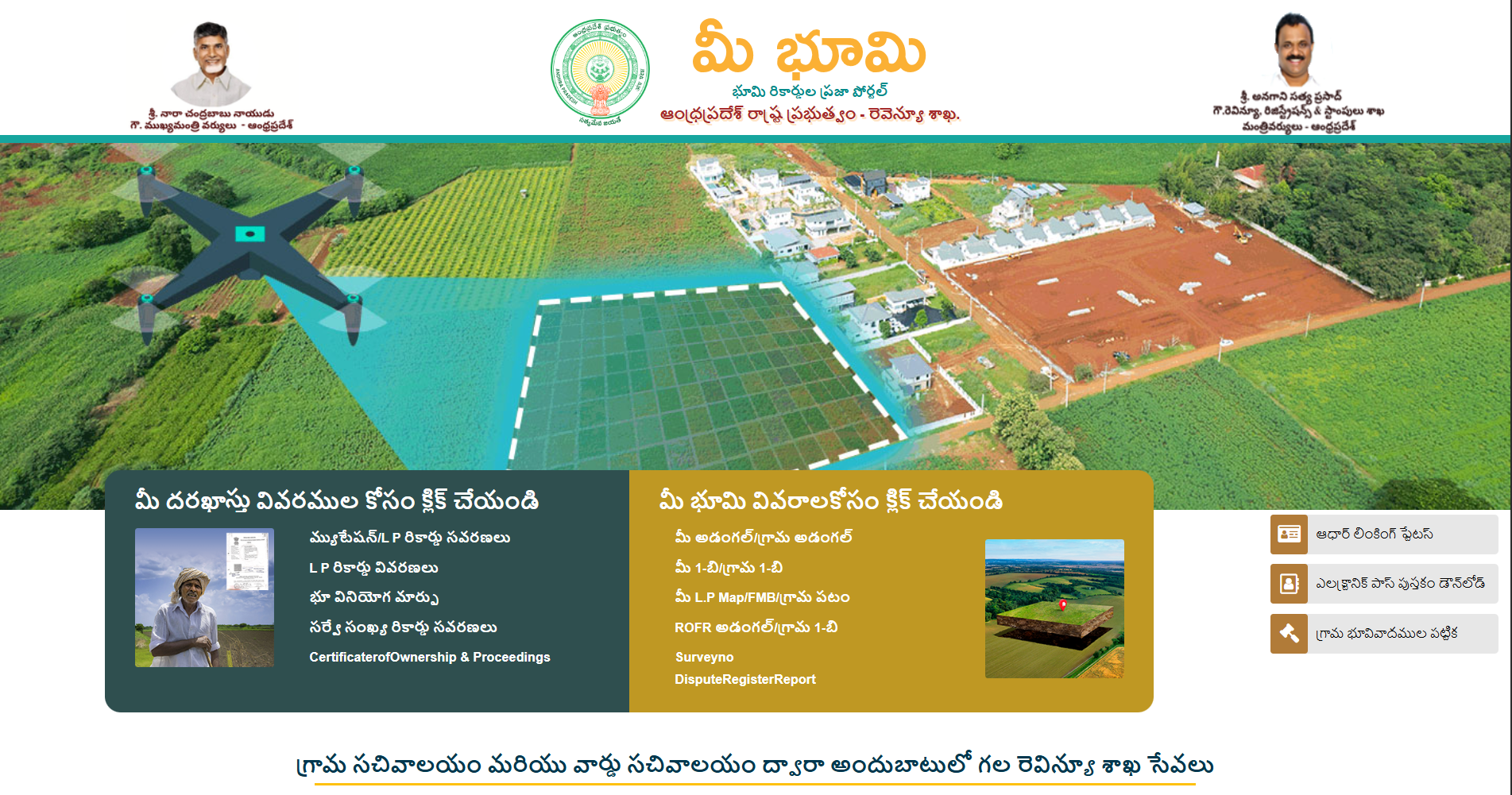
Check Your Adangal, Village Adangal
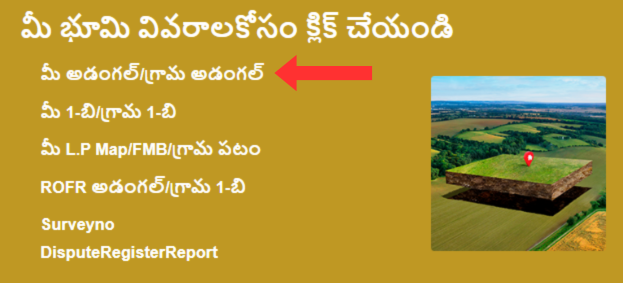
Go to Mee-Bhoomi portal Homepage > మీ భూమి వివరాలకోసం క్లిక్ చేయండి > మీ అడంగల్/గ్రామ అడంగల్
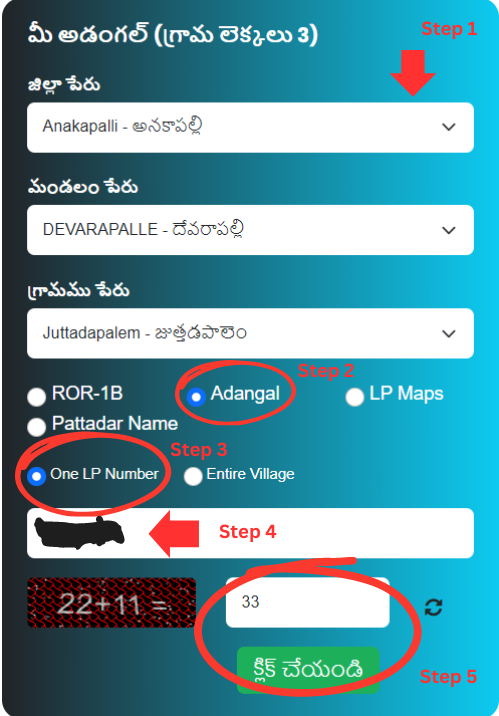
Step 1 – Enter Land Details –
To check your Adangal or Village Adangal, first choose your land location. Start by selecting your District, then choose your Mandal, and after that select your Village.
Next, click on the Adangal land record option. You will see two choices: One Khata Number or Entire Village.
For this example, we are choosing One Khata Number. Then, enter your Khata Number in the given box. After that, type the captcha code shown on the screen. Finally, click the Submit/Click button to view your land record.
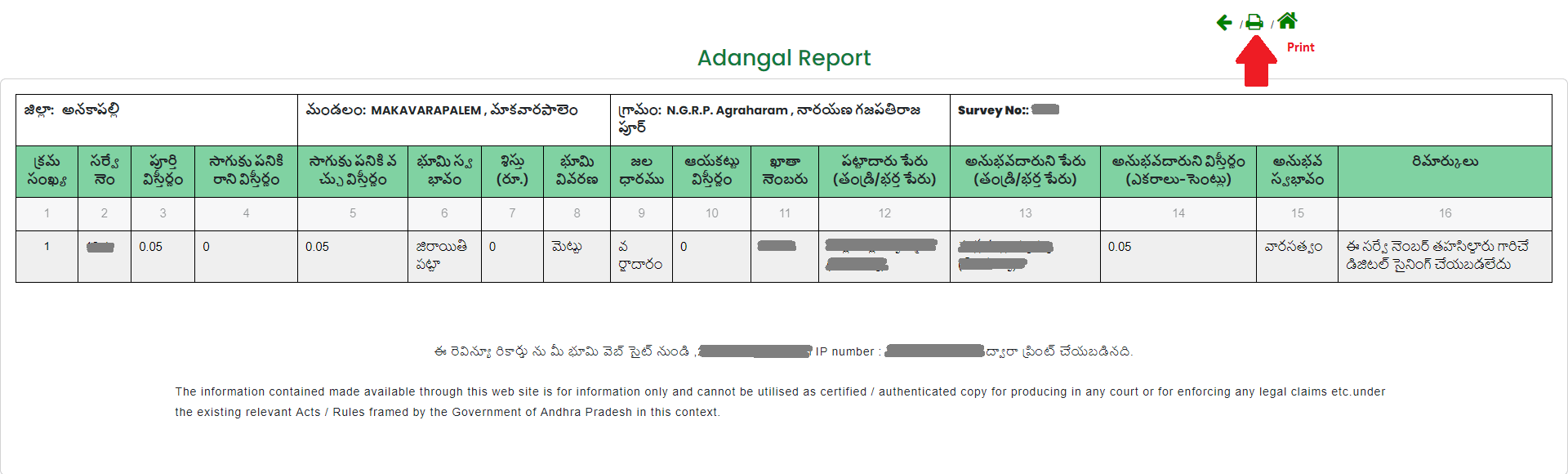
Step 2 – View/Print Your Adangal/Village –
After that, your Adangal Report will be shown on the screen. In this report, you can see details like the land description, total area, water source, account number, pattadar number, owner’s name, type of land, and any remarks. If you need a copy, simply click on the Print button to download or print the report.
Check Me 1B/Village 1B
Go to Mee Bhoomi Homepage > మీ భూమి వివరాలకోసం క్లిక్ చేయండి > 1-బి)/గ్రామం 1-బి (1B/Village 1B)
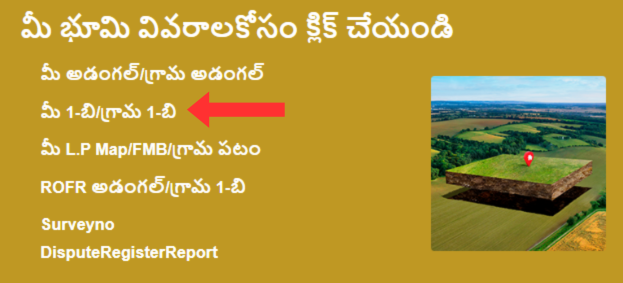
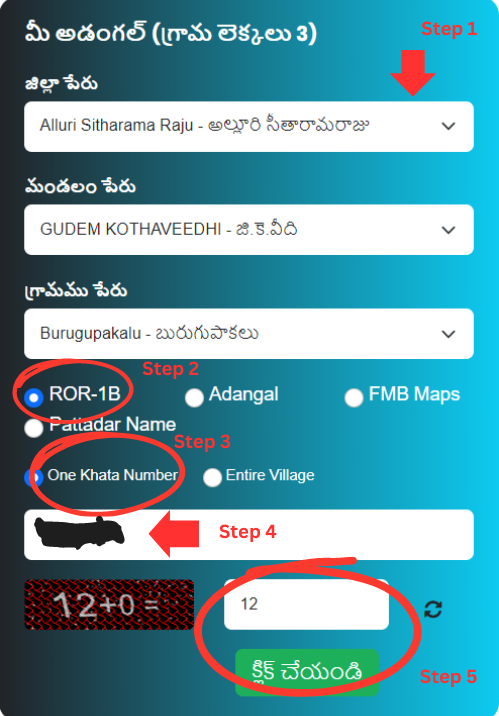
Step 1 – Enter Land Details –To check your 1B or Village 1B land record, first choose your land location. Select your District, then your Mandal, and after that choose your Village from the list.
Next, click on the ROR-1B option to open the land record page. You will see two choices: One Khata Number or Entire Village.
For this example, choose One Khata Number. Then, enter your Khata Number in the given box. After that, type the Captcha code exactly as shown on the screen. Finally, click the “Click” button to view your land record.
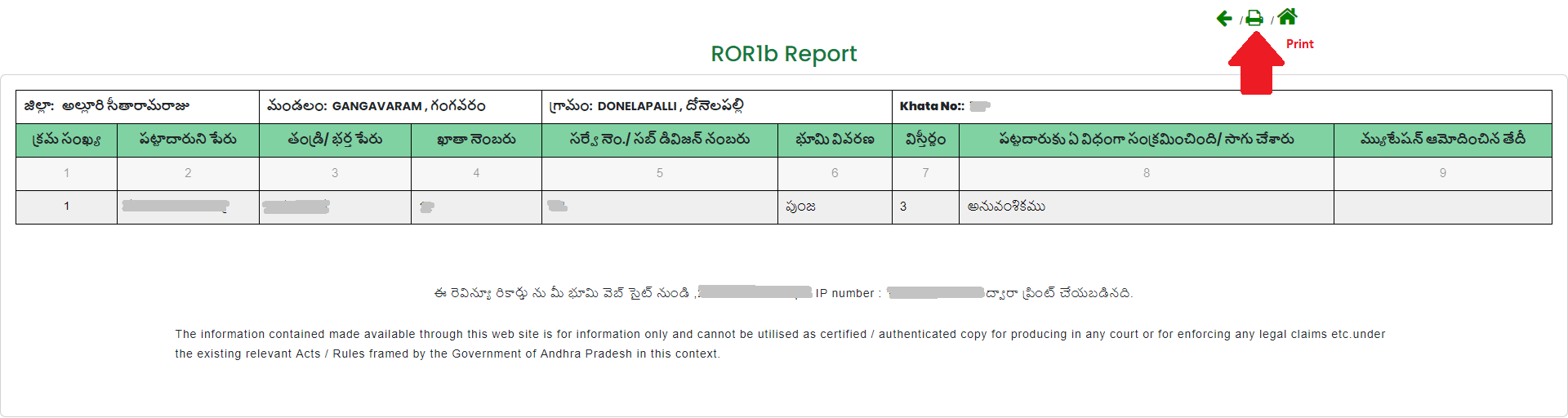
Step 2 – View/Print 1B/Village –
After you complete the process, your 1B Report will appear on the screen. If you need a hard copy, simply click on the Print button to download or print it.
This report includes important details such as the graduate’s name, Khata number, survey number, full land description, total area of the land, cultivation details, and the date when the mutation was approved. It gives you clear and complete information about the land record.
Check Your LP Map/FMB/Village Map
Go to Mee Bhoomi Homepage > మీ భూమి వివరాలకోసం క్లిక్ చేయండి > మీ L.P Map/FMB/గ్రామ పటం
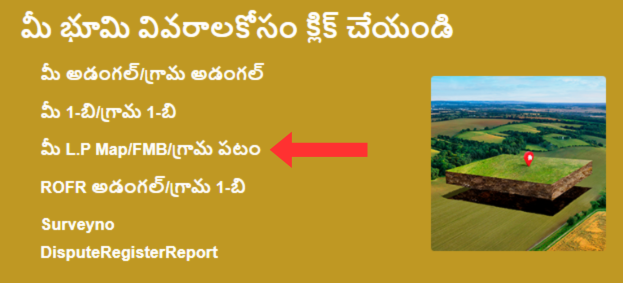
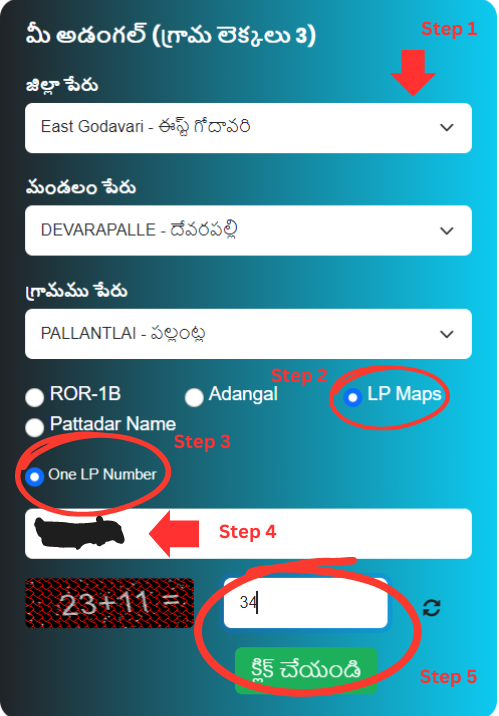
Step 1 – Enter Land Details –
- To check your Village Map, first choose your land location. Select your District, then your Mandal, and after that, pick your Village from the list.
- Next, click on the LP Maps land record option. You will see two choices: One Khata Number or Village Map.
- For this example, we are selecting the Village Map option.
- Finally, enter the captcha code shown on the screen and click the Click button to view your map.
Step 2 – View Village Map
At the end, your Village Map will open on the screen. You will be able to see all the land plots clearly marked on the map. This makes it easy to find and understand the exact location of any piece of land.
Check ROFR Adangal/Village 1-B
Go to Mee Bhoomi Homepage > మీ భూమి వివరాలకోసం క్లిక్ చేయండి > ROFR అడంగల్/గ్రామ 1-బి
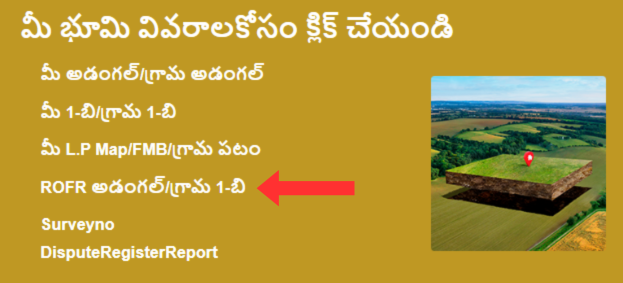
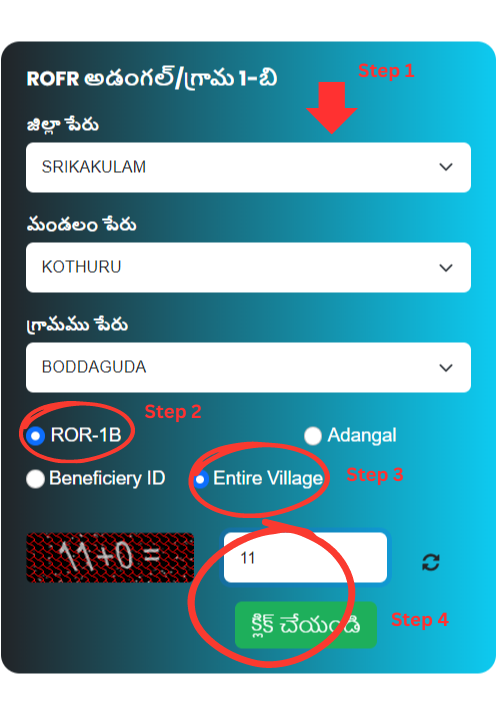
Step 1 – Enter Land Details –
- To view your Village Map, first choose your land location. Select your District, then your Mandal, and after that, pick your Village from the list.
- Next, you need to choose the type of land record. You can select either ROR-1B or Adangal. After selecting the record type, choose one option — Beneficiary ID or Entire Village Map.
- For this example, we are selecting Entire Village Map to show how it works.
- In the last step, enter the captcha code shown on the screen and click the Click button to continue.
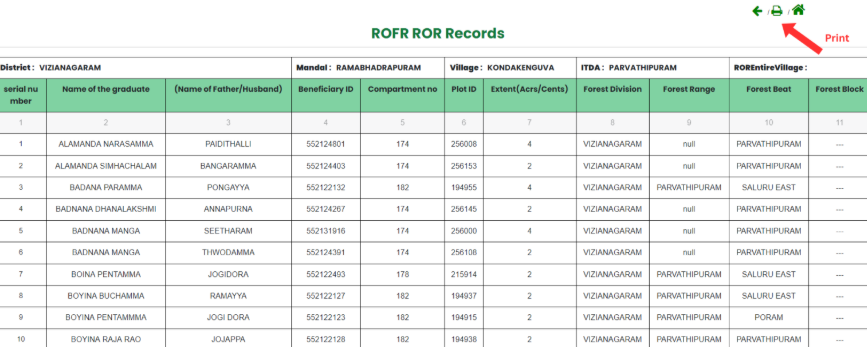
Step 2 – View/Print ROFR ROR Records
As a result, your ROFR Adangal or Village 1-B information will appear on the screen. You will get the Name of the graduate, Beneficiary ID, Compartment no., Plot ID, Forest Detail, and other information.
Check Survey No Dispute Register Report
Go to Mee Bhoomi Homepage > మీ భూమి వివరాలకోసం క్లిక్ చేయండి > SurveyNo DisputeRegisterReport
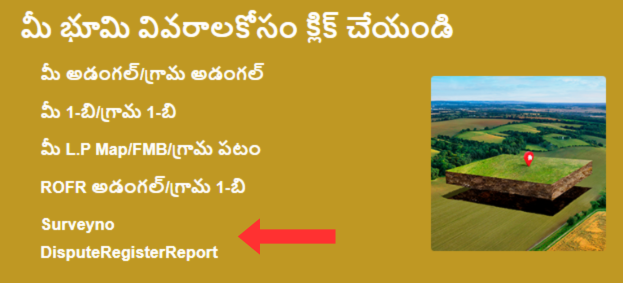
Step 1 – Check the Details of Land Disputes –
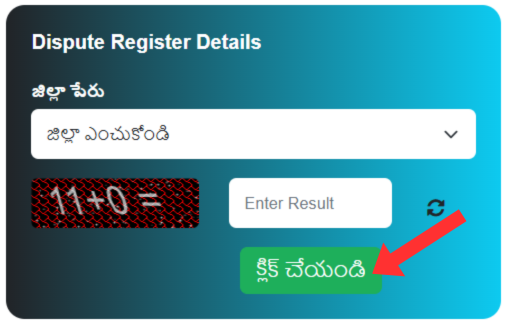
To check the Dispute Register Details, select your “District Name” from the drop-down menu and then solve the math captcha, click the “Submit” button.
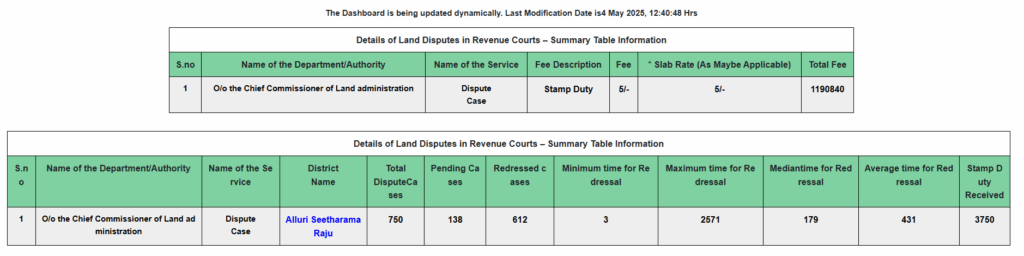
Step 2 – Details of Land Disputes in Revenue Courts –
Download Electronic Passbook
Go to Mee Bhoomi Homepage > Electronic Pass Book Download (ఎలక్ట్రానిక్ భూమి యాజమాన్యపు హక్కు పత్రము మరియు పట్టాదారు పాసు పుస్తకము)
Step 1 – Enter Land Details –
To view your E-Passbook, first choose your land details. Select your District, then your Mandal, and finally your Village from the list. After that, type in your Account Number.
If your mobile number is already linked to your account, you can move forward to the next step and continue the process.
Enter the Captcha and click on the Click button.
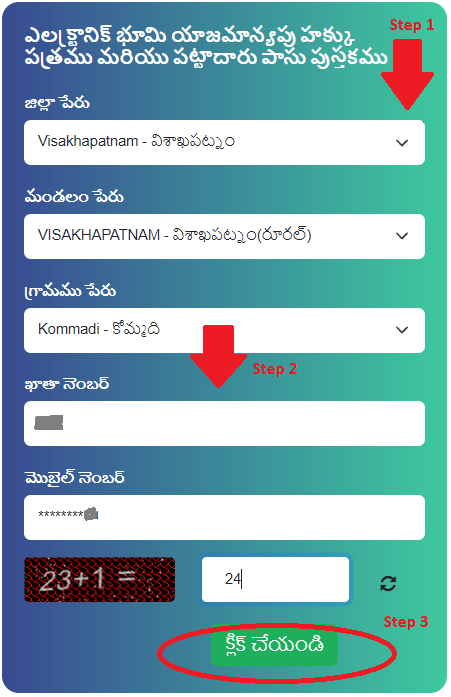
Step 2 – Download E-Passbook –
You will receive an OTP on your linked mobile number. Click on the OK button and submit the OTP.
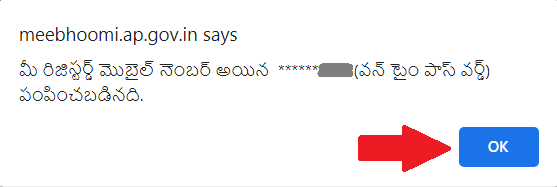
After entering the OTP, your Electronic Passbook will appear on the screen. Now you can verify the land ownership.
Check Aadhaar Linking of Your Account
Go to Mee Bhoomi Homepage > Aadhaar Linking Status (మీ ఖాతా నెంబరు తో మీ ఆధార్ నెంబరుజత పరచబడినదో లేదో తెలుసుకోండి)
Step 1 – Enter Land Details –
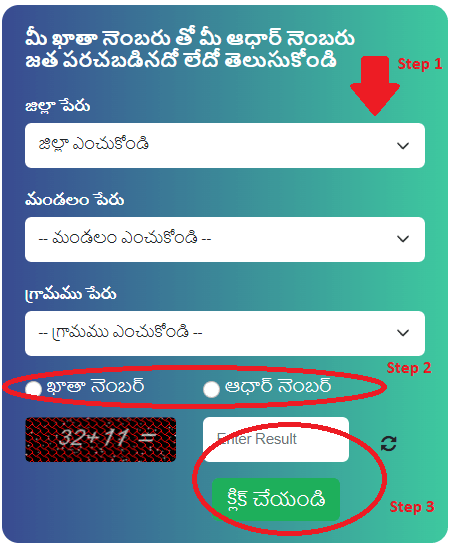
- To check your Aadhaar linking status, first select your land details. Choose your District, then your Mandal, and finally your Village from the list.
- After selecting your location, you can check the status using either your Account Number or your Aadhaar Number. Select any one option and enter the required number. Then type the captcha code shown on the screen and click the Submit button.
- Your Aadhaar linking status will then appear on the screen.
Step 2 – View Aadhaar Linking Status –
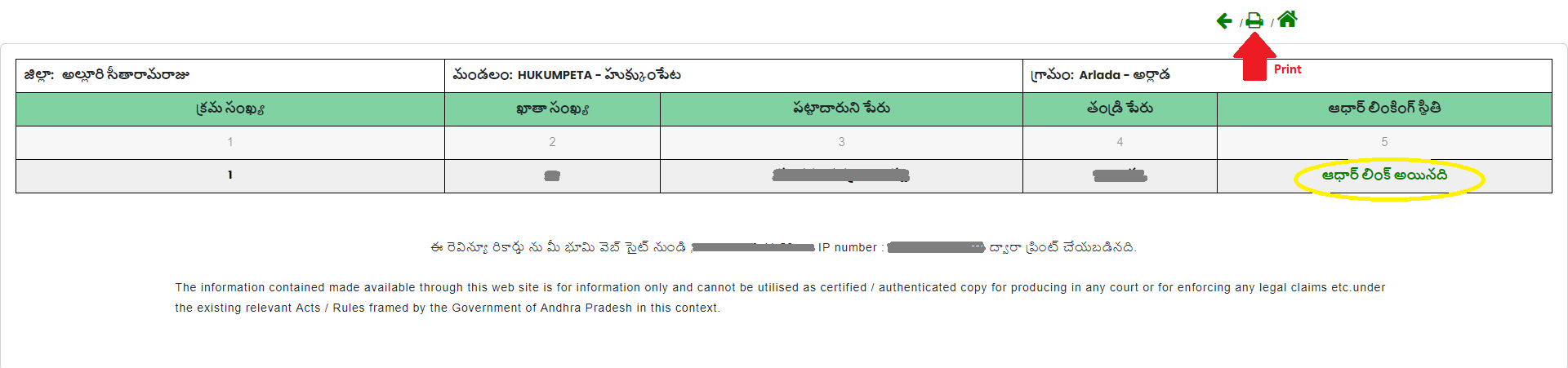
As a result, you can easily check your Aadhaar linking status online and even print the details for your records. The page will show important information such as your account number, the graduate’s name, and whether your Aadhaar has been successfully linked or not.
Check Village Land Dispute
Go to Mee Bhoomi Homepage > Table of Village Land Disputes (గ్రామ భూవివాదముల పట్టిక)
Step 1 – Enter Land Details –
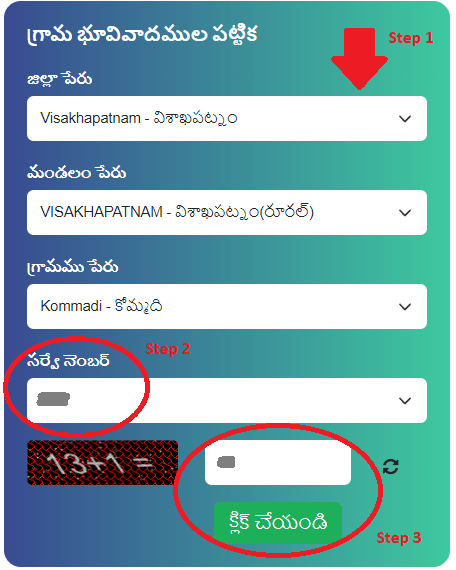
- To check your Village Land Dispute status, first choose your land location. Select your District, then your Mandal, and then your Village from the list.
- Next, enter your Survey Number in the given box. After that, type the Captcha code exactly as shown on the screen.
- Finally, click on the “Click” button to view the details.
Step 2 – View Land Dispute –
After that, your Village Land Dispute Status will be shown on the screen. You will see important details like the Dispute ID, court name, type of case, and remarks. It will also show the Survey Number, case or file number, current status of the case, and the names of the petitioner and respondent. If you need a copy, simply click on the Print icon to download or print the report.

| Visit Official Meebhoomi Portal –> | meebhoomi.ap.gov.in |
FAQ’s
1. What is Mee Bhoomi?
Mee-Bhoomi is an online land records portal launched by the Government of Andhra Pradesh. It allows citizens to check land details, ownership records, and other property information from their homes.
2. What services are available on MeeBhoomi?
Users can view Adangal, 1-B records, village maps, land ownership details, and mutation status. It also provides information about land disputes and survey numbers.
3. Is Bhoomi free to use?
Yes, checking basic land records online is free. However, you may need to pay a small fee if you want an official certified copy from the concerned office.
4. How can I check my land details on Bhoomi?
You need to visit the official Bhoomi website and enter details like district, mandal, village, and survey number or Aadhaar number to search your land record.
5. Can I download land records from MeeBhoomi?
Yes, you can view and download digital copies of records. For legal purposes, you may need to get them verified by the local revenue office.
6. What should I do if there is a mistake in my land record?
If you find any error, you should contact the local Tahsildar or revenue office to request correction through the proper process.
Conclusion
MeeBhoomi has made it easier for people in Andhra Pradesh to access their land records online. It saves time, reduces paperwork, and increases transparency in land management. By using this portal, citizens can quickly check their property details without visiting government offices again and again. Overall, Bhoomi is a helpful and user-friendly platform for managing land information in a simple and convenient way.